# ASRock

1. As soon as you see the ASRock logo on the screen, press **F2 or Del** keys to get to the UEFI setup.

<figure><img src="https://whar.gitbook.io/~gitbook/image?url=https%3A%2F%2F2478545938-files.gitbook.io%2F%7E%2Ffiles%2Fv0%2Fb%2Fgitbook-x-prod.appspot.com%2Fo%2Fspaces%252F7a73YWIJfp26w2K67aBa%252Fuploads%252FKcsUoI4Lf9x5YbSpokPo%252Fimage.png%3Falt%3Dmedia%26token%3D2c121704-87b9-465f-8346-296a9cabf547&#x26;width=768&#x26;dpr=4&#x26;quality=100&#x26;sign=cc1bf83a&#x26;sv=2" alt=""><figcaption></figcaption></figure>

If you are in the EZ mode interface, press **F6** to get to **Advanced Mode**.

<figure><img src="https://whar.gitbook.io/~gitbook/image?url=https%3A%2F%2F2478545938-files.gitbook.io%2F%7E%2Ffiles%2Fv0%2Fb%2Fgitbook-x-prod.appspot.com%2Fo%2Fspaces%252F7a73YWIJfp26w2K67aBa%252Fuploads%252FabWLBkJijLfcmi5jv50L%252Fimage.png%3Falt%3Dmedia%26token%3D698affe3-5d56-4cfa-8963-6e670b6294f2&#x26;width=768&#x26;dpr=4&#x26;quality=100&#x26;sign=172bd8a8&#x26;sv=2" alt=""><figcaption></figcaption></figure>

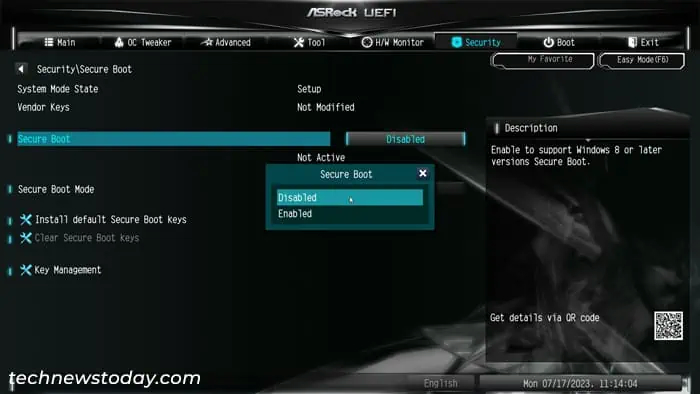
Head over to the **Security** tab and select **Secure Boot**.

<figure><img src="https://whar.gitbook.io/~gitbook/image?url=https%3A%2F%2F2478545938-files.gitbook.io%2F%7E%2Ffiles%2Fv0%2Fb%2Fgitbook-x-prod.appspot.com%2Fo%2Fspaces%252F7a73YWIJfp26w2K67aBa%252Fuploads%252F2PLuJlQT4IuVI127Q6CJ%252Fimage.png%3Falt%3Dmedia%26token%3D5073333c-a022-4e09-876c-04d10a220392&#x26;width=768&#x26;dpr=4&#x26;quality=100&#x26;sign=d5fd6341&#x26;sv=2" alt=""><figcaption></figcaption></figure>

Select **Secure Boot**, set it to **Disabled** and press Enter.

<figure><img src="https://2478545938-files.gitbook.io/~/files/v0/b/gitbook-x-prod.appspot.com/o/spaces%2F7a73YWIJfp26w2K67aBa%2Fuploads%2F1deGa2ZnfRyBNrmGr4Mk%2Fimage.avif?alt=media&#x26;token=da08687e-b58e-46d0-a643-273c41d2795e" alt=""><figcaption></figcaption></figure>

Press **F10** and click **Yes** to save the changes and exit the UEFI/BIOS.